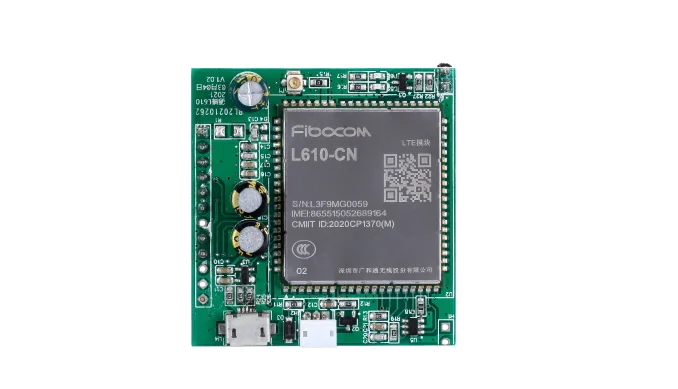
工业控制板

QL-4G-300 4G IoT 控制板

用于售货机、咖啡机、洗衣机和自助设备的机器侧控制板。可通过 API、4G 或串口连接你的支付系统和后端。

4G uplinkRS485 / pulseOffline bufferOwn backend
QL-4G-300 4G IoT 控制板

项目适配

适用场景

买家信号

  • Sites without reliable local network or a local PC.
  • Machines that expose serial, RS485, pulse, or relay signals.
  • Projects that need heartbeat, session, fault, or meter data.
  • Teams that want data in their own backend, not a closed portal.

首先需要提供

  • 机器照片或现有主板照片
  • 接口或接线说明
  • 支付/API 后要触发的动作
  • 是否需要数据上传

不适合的情况

  • The machine has no usable data or control interface.
  • You need guaranteed cellular coverage before a site survey.
  • You only need a local dashboard with no backend integration.

集成方式

从 API 指令到机器动作

你的支付系统或后端确认后调用 QuLink,板子执行机器动作并把结果返回。具体接口在样品上确认。

Product model
QL-4G-300
Connectivity
4G LTE Cat.1; Wi-Fi and Ethernet optional
Communication
RS485 / RS232 / UART
Relay
2 channels; NO / NC / COM
Relay rating
10A 250VAC / 10A 30VDC
Pulse input
2 channels; 5–24V opto-isolated
Power input
12–24V DC; 2A
Offline storage
8 GB; up to 30 days
Data output
HTTP API / webhook; MQTT optional
Firmware
Standard firmware; OTA update support
Indicative sample price
USD 149–229 for one sample; final quote after interface review
Applications
Remote monitoring, vending, laundry, lockers, utility equipment

控制流程

从机器接口到 API 控制的执行结果。

Confirm the machine interface

Send the controller label, wiring photos, and the action the machine must perform.

Map the command

Define the API command, machine action, result fields, timeout, and fault behavior.

Test one machine

Validate the command, machine action, result, and reconnect behavior on a sample.

Configure the rollout

Confirm connector, firmware, quantity, and support before production.

API 示例

服务器命令或 webhook 示例。

命令字段取决于机器接口、固件配置,以及由支付还是你的应用触发。

POST /v1/devices/SITE-12/events
{
  "event": "telemetry",
  "device_id": "SITE-12",
  "fields": ["heartbeat", "session_state", "fault"]
}

项目询盘

先发机器照片,我们帮你判断主板、接口和样品测试步骤。

发送机器型号、控制器照片和目标动作,我们确认 4G IoT 控制板 的接口路径和样品测试步骤。

一条有效的第一条消息

如果不确定机器接口,先发你手上的资料即可。照片往往比长文档更快判断方向。

  • 机器类型和目标国家
  • 机器照片、主板照片或线束照片
  • 支付或 API 后要触发的动作
  • 是否需要数据上传、预计数量
最快的第一步
  • 发送机器照片
  • 说明 API 或支付后要触发什么动作
  • 告诉我们是否需要数据上传
选填:公司、数量、接口和数据需求

建议写清楚机器类型、支付/API 后要触发的动作、是否有照片、预计数量。我们通常 24 小时内回复。

有机器或主板照片?请通过 WhatsApp 发送,我们通常先看照片再判断接口。

常见问题

打样前通常会问的问题。

Does it work with our own backend?

Yes. Event delivery can be configured for your HTTP API, webhook, or MQTT broker, depending on the project.

What data can it report?

It depends on the machine interface. Heartbeat, session state, relay or pulse events, and fault signals are common starting points.

Does it need a SIM card?

Yes for cellular operation. SIM, antenna, and site coverage are confirmed during the sample test.

What should I send first?

Controller model, serial or pulse interface, data fields needed, and where the data should go.

发送机器照片 发送项目咨询