MDB API integration

Connect an MDB vending machine to your API for payment-triggered vend commands.

Use QuLink when your app, wallet, or backend needs to authorize vend actions and receive vending events without implementing MDB behavior from scratch.
MDB vend commandPayment callbackTelemetryNo SaaS lock-in
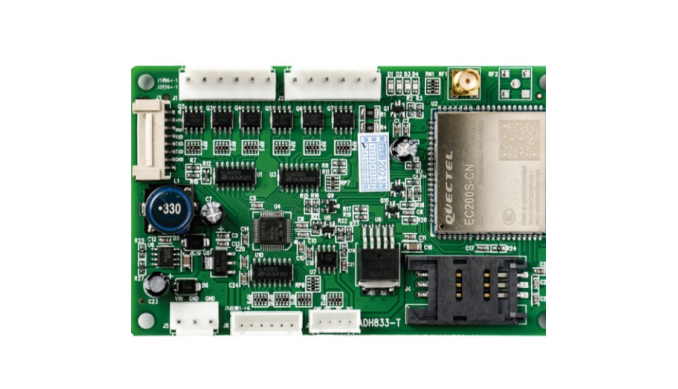
MDB vending machine API integration board

Project fit

For software teams and payment apps connecting MDB machines

Buyer signals

  • You need backend-controlled vending behavior.
  • Payment approval should become an MDB vend action.
  • Your server needs vend result, fault, or online status callbacks.
  • You want a board-level bridge instead of a closed vending SaaS.

What to send first

  • Machine photo or existing board photo
  • Interface or wiring note if available
  • Target action after API command or payment
  • Whether telemetry or data upload is required

Not the right fit if

  • You only need a pure payment acquiring account and no machine-side control.
  • There is no physical machine action after payment, booking, or API approval.
  • The project has no machine photo, board photo, wiring note, or interface clue yet.

Integration model

Your backend owns the logic; QuLink handles MDB machine behavior

The integration keeps business rules, payment, pricing, and user data in your platform while QuLink translates commands to machine-side actions.

Machine interface
MDB vending or MDB cashless path
Server command
dispense, query_status, start_session, cancel
Events
vend.result, machine.fault, telemetry.updated, device.online
Project mode
developer sample, vending fleet pilot, payment app integration

Workflow

From machine interface to API-controlled result.

Confirm MDB wiring

Share machine and payment module photos to confirm the MDB path.

Define API command

Map slot/product, payment reference, timeout, and expected callback.

Run integration sample

Test API command and machine result on a real unit.

Prepare rollout

Tune firmware profile, error handling, and fleet provisioning.

API example

A clear server command or webhook for the machine-side action.

The exact command fields depend on machine interface, firmware profile, and whether payment or your own app triggers the action.

POST /v1/devices/MDB-1049/commands
{
  "command": "dispense",
  "source": "api_command",
  "reference_id": "ORDER-1049-A07",
  "machine_action": {
    "interface": "mdb",
    "slot": "A07"
  }
}

Start the project

Send the first machine details before writing a full spec.

Send the MDB machine model, payment module photo, API trigger need, and data fields you want back.

Useful first message
  • Machine type and target country
  • Machine photo, board photo, or wiring photo
  • Action after API command or payment
  • Data upload and estimated quantity

FAQ

Questions buyers usually ask before a sample test.

Can QuLink expose a simple API over MDB?

Yes. The goal is to hide machine-side MDB complexity behind project-specific commands and events.

Can this work with a wallet app?

Yes. The wallet can approve payment and call the QuLink command workflow.

Can QuLink upload vending faults?

Yes, fault and telemetry support depends on the available machine-side signals and MDB behavior.