Machine online / offline
A heartbeat and last-seen time show whether the machine is reachable before a site visit.
Vending remote monitoring
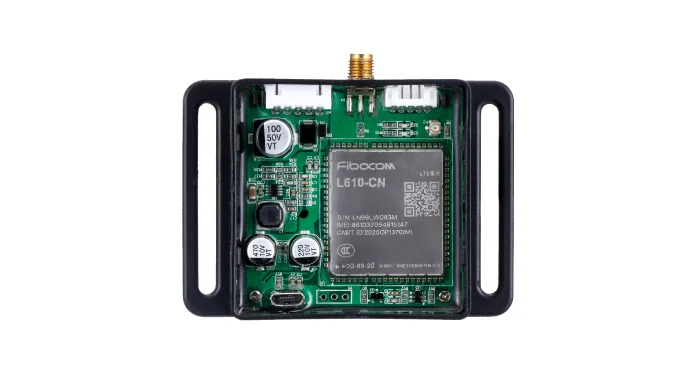
You can add remote monitoring to an existing vending machine by connecting a 4G data bridge or MDB gateway to the controller or MDB path, then sending heartbeat, vend result, fault, and optional sensor data to your own backend. The existing controller and reader can usually stay in place when the machine exposes the required signals; the exact data set is confirmed on a sample.
Part of Machine Data Upload IoT Board for Self-Service Equipment
What you can monitor
Start with the data your operation actually needs. The machine interface determines what can be reported.
A heartbeat and last-seen time show whether the machine is reachable before a site visit.
Track successful and failed vends, payment references, slot IDs, and timeouts when the controller exposes them.
Report machine faults, reader drops, or controller alarms when the interface provides them.
Add door, temperature, pulse, or meter data where the machine and sensors expose it.
Before you connect
Confirm whether the machine exposes MDB events, serial/RS485 frames, relay state, pulse counts, or sensor inputs.
Check 4G coverage, SIM policy, antenna placement, and whether local Wi-Fi or Ethernet is available.
Decide where the data should go: your API, dashboard, ERP, or maintenance workflow.
Define offline buffering, retry rules, duplicate handling, and who receives an alert.
Pilot flow
Machine front, controller board, model label, connectors, and any existing network or reader module.
Confirm which events are available and how often they should be sent.
Define the webhook or API payload, device identity, retry policy, and dashboard fields.
Verify online/offline detection, vend events, faults, buffering, and reconnect behavior.
Where QuLink fits
Interfaces and transport
FAQ
Often yes, when the controller exposes MDB events, serial/RS485 data, relay state, pulse counts, or sensor inputs. The available signals are confirmed on a sample.
No. Remote monitoring can be independent of the payment reader. If a reader is present, its status or events may be included when it exposes them.
Typical projects report online/offline status, last-seen time, vend results, faults, and usage events. Door, temperature, pulse, or meter data depends on the machine and sensors.
Yes. QuLink can send webhook or API events to your own backend; field names, frequency, and retries are defined per project.
Machine model, controller photos, existing connectivity or reader setup, the events you need, and the target dashboard or API.
Project RFQ
Send the vending machine model, controller photos, existing network or reader setup, the events you need, and the target dashboard or API.
If you are unsure about the exact interface, send what you have. Photos often answer more than a long spec.
Related use cases