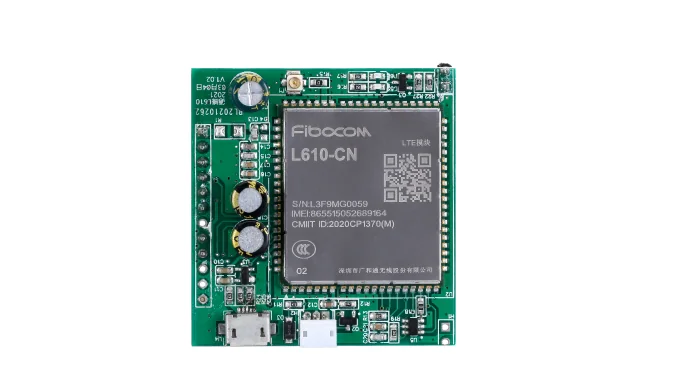
RS485 to 4G

RS485 to 4G gateway for machine data and remote commands.

Use QuLink when a PLC, cabinet controller, sensor, or legacy RS485 machine needs cellular data upload and remote commands without a local PC.

RS485 / Modbus4G uploadRemote commandsOTA-ready
RS485 to 4G gateway board for machine data upload

Project fit

For remote sites, PLCs, and legacy RS485 equipment

Buyer signals

  • Machines with RS485 or Modbus RTU interfaces.
  • Sites without reliable local network or PC.
  • Projects that need telemetry, alarms, or remote commands.
  • Fleets that need OTA-ready hardware and device identity.

What to send first

  • Machine photo or existing board photo
  • Interface or wiring note if available
  • Target action after API command or payment
  • Whether telemetry or data upload is required

Not the right fit if

  • You only need a pure payment acquiring account and no machine-side control.
  • There is no physical machine action after payment, booking, or API approval.
  • The project has no machine photo, board photo, wiring note, or interface clue yet.

Integration model

RS485 frames become cloud data

QuLink reads or writes RS485 registers and frames, then publishes telemetry and events over 4G. Protocol details and register maps are confirmed per machine.

Machine interface
RS485 half/full duplex, Modbus RTU/ASCII or custom frames (project-dependent)
Connectivity
4G cellular, SIM, antenna, OTA-ready profile
Commands
read registers, write register, relay output, query status
Data returned
telemetry, register values, fault, heartbeat, online/offline
Project mode
remote monitoring, PLC integration, OEM gateway

Workflow

From machine interface to API-controlled result.

Confirm protocol

Collect the RS485 wiring, baud rate, parity, slave ID, and register or frame map.

Map data points

Define which values are read, written, logged, or alarmed.

Install and connect

Confirm SIM, antenna, power, enclosure, and network coverage.

Test remote flow

Verify polling, write commands, reconnect behavior, and alarm upload.

API example

A clear server command or webhook for the machine-side action.

The exact command fields depend on machine interface, firmware profile, and whether payment or your own app triggers the action.

POST /v1/devices/RS485-07/commands
{
  "command": "read_registers",
  "source": "api_command",
  "machine_action": {
    "slave_id": 1,
    "register": 40001,
    "count": 4
  }
}

Project RFQ

Send a machine photo. We help identify the board, interface, and next test step.

Send the machine model, RS485 wiring, protocol and register map, data points, installation country, and quantity.

A good first message

If you are unsure about the exact interface, send what you have. Photos often answer more than a long spec.

  • Machine type and target country
  • Machine photo, board photo, or wiring photo
  • Action after payment or API command
  • Need data upload? expected quantity?
Fastest first step
  • Send a machine photo
  • Describe the action after API or payment
  • Tell us if data upload is needed
Project checklist

Tip: include machine type, target action after payment/API, photo availability, and expected quantity. We usually reply within 24 hours.

Have machine or board photos? Send them on WhatsApp — we usually review photos there first.

FAQ

Questions buyers usually ask before a sample test.

Does QuLink support Modbus RTU?

Support depends on the board and firmware profile. Send the register map, baud rate, and slave ID so we can confirm the integration.

Can it work without WiFi?

Yes, a 4G profile can be used where cellular coverage and SIM policy allow.

Can it both read and write registers?

Yes, read and write commands can be scoped per project, with safety and permission rules.

Can it upload alarms?

Yes. Fault, threshold, and device status events can be published to your backend.

WhatsApp photo Send details