01
Reader shows offline, but the machine still vends
Likely layer
Reader, SIM, antenna, or payment host
First check
Check the reader status light, SIM data, antenna, and provider portal first.
Vending card reader offline
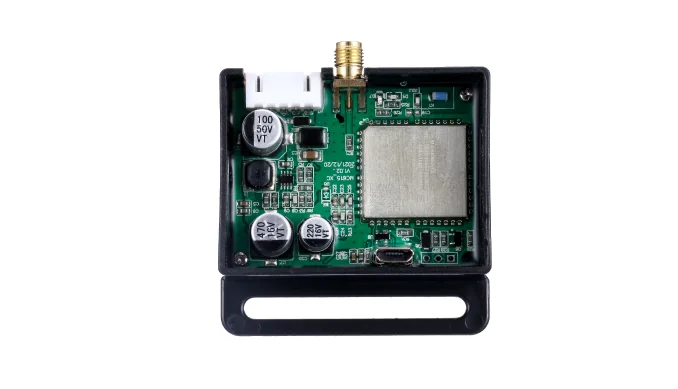
An offline vending card reader is usually a power, SIM/data, antenna, MDB harness, reader, or payment-host issue, not a failed vending controller. Check those five layers first. If the reader stays unreliable, a QuLink 4G MDB gateway can add an independent heartbeat, vend-result, and fault path while the existing controller and payment provider stay in place; machine-level verification is pending sample (reviewed 2026-10-26).
Part of Machine Data Upload IoT Board for Self-Service Equipment
Quick triage
Match the symptom before touching the hardware. The reader, the machine controller, the site power, and the payment host fail in different ways.
Reader, SIM, antenna, or payment host
Check the reader status light, SIM data, antenna, and provider portal first.
Machine power, breaker, or controller
Restore machine power and controller boot before diagnosing the reader.
Cellular coverage, antenna placement, or local network
Compare signal at the machine and move the antenna outside the metal cabinet.
MDB or serial harness
Reseat the connector, inspect pins, and confirm the controller sees the reader.
Power stability, heat, firmware, or provider session
Check supply voltage, reboot behavior, firmware, and reader logs.
Five checks
Do these in order. Stop when you find the layer that is actually failing, and do not replace the reader before the harness and payment host are ruled out.
Confirm the reader has stable power, a booting display or status light, and no loose connector. A reader that reboots with the machine points to a power or harness issue.
Confirm the SIM is active, has data, and is not blocked. Check whether the payment provider or portal reports the same offline state for that device.
Inspect the antenna connection, cable routing, and mounting position. Metal cabinets, basements, and cold rooms can weaken coverage even when a phone shows signal nearby.
Reseat the MDB or serial connector, inspect for damaged pins, and confirm the reader is still recognized by the vending controller. Capture photos before changing wiring.
If the reader remains unreliable, use a QuLink 4G gateway or data bridge to report heartbeat, last-seen time, vend result, and faults to your own backend, then test reconnect and offline behavior on one machine.
Decision
Use the triage result to choose the smallest change that restores card payments. Not every offline reader needs a new board.
The reader works most of the time, but you cannot see offline events, vend results, or faults. Add a QuLink 4G gateway on the machine side and keep the existing payment provider.
The reader is an old 3G model, has failing firmware, or cannot stay connected after the five checks. Replace it, or use a QuLink QR payment path if scan-to-start fits the machine.
The machine loses power, the cabinet blocks signal, or the SIM/data plan is wrong. Fix those first; new hardware will not solve a site problem.
Where QuLink fits
QuLink is useful when the reader or controller is healthy enough to keep, but you need an independent 4G path for heartbeat, vend results, and faults.
Optional telemetry
This part is optional and comes after the offline problem is understood. Available fields depend on the reader, controller, and machine interface.
Last-seen time and online/offline state for the gateway.
Success, failure, timeout, slot, and payment reference when available.
Machine fault, reader drop, or controller event when exposed.
Technical teams can receive these as webhook, HTTP API, or MQTT events, depending on the project.
FAQ
Start with the five checks; these are the questions that decide whether a sample test makes sense.
Common causes include weak cellular coverage, antenna placement, a SIM or data-plan problem, a loose power or MDB connector, reader firmware, or an unavailable payment host. Check each layer before replacing the reader.
That usually points to the reader, SIM, antenna, MDB harness, or payment host rather than the vending controller. Start with the reader status light, power, and harness, then confirm the SIM and provider portal before replacing hardware.
Often yes. QuLink can add an independent machine-side status and data path while your reader and payment provider stay in place. The exact signals depend on the reader and controller.
No. QuLink is machine-side control and data hardware. We can provide an optional QuLink QR payment workflow, but we are not a bank, acquirer, or closed payment portal.
Sometimes. Serial, RS485, relay, pulse, or sensor inputs can be evaluated from photos and wiring. MDB cashless is the cleanest path for vending events.
Send the reader model, controller and MDB photos, SIM and antenna setup, the offline symptom, and the events you need in your backend.
Project RFQ
Send the reader model, controller and MDB photos, SIM and antenna setup, the offline symptom, and the events you need in your backend.
If you are unsure about the exact interface, send what you have. Photos often answer more than a long spec.
Related use cases